Nuxt 3 프로젝트에서 서브도메인 처리하기
Summary
Summary
Nuxt 3의 커스텀 라우팅(`app/router.options.ts`)을 이용해 서브도메인에 따라 PC/모바일 페이지를 분기하는 방법과 구현 포인트를 정리합니다.
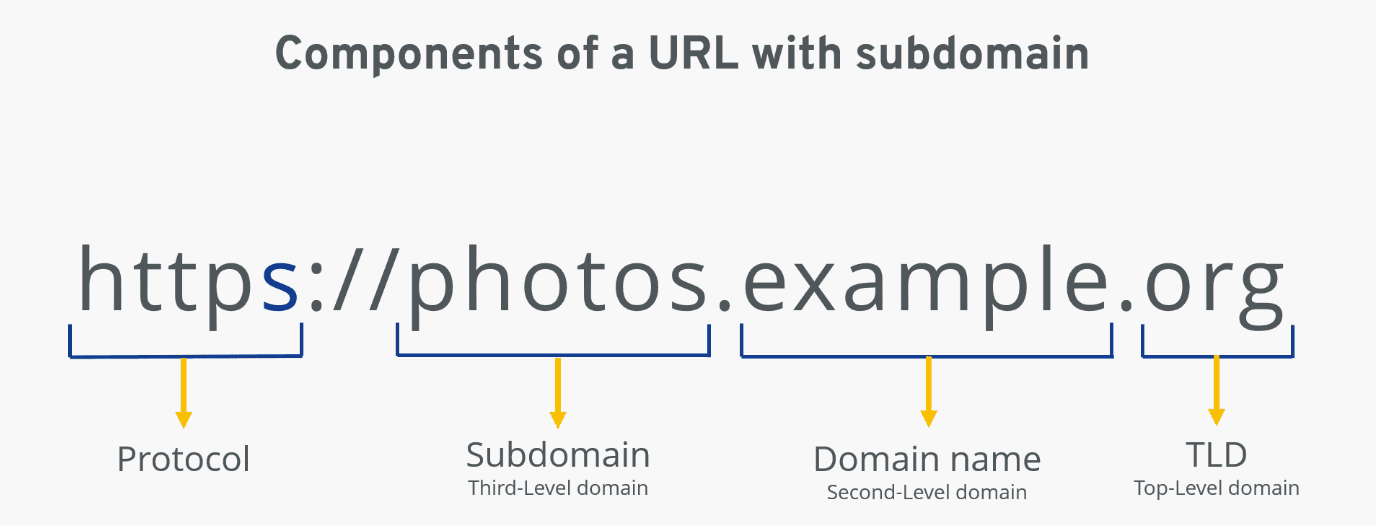
기존에 Nuxt 3로 만들어진 PC용 사이트에 서브도메인을 적용하여, 서브도메인에 따라 PC/모바일 화면이 구분되도록 만들어야 했습니다. 이 글에서는 Nuxt 3 프로젝트에서 서브도메인에 따라 페이지를 분기하는 방법을 정리합니다.
서브도메인이란?
서브도메인은 웹사이트의 영역을 구분하기 위해 도메인 이름 앞에 추가되는 접두사를 의미합니다. 서브도메인을 사용하면 상점, 블로그, 게시판처럼 자체적인 계층 구조가 필요한 영역을 분리하여 관리하기가 쉬워집니다.
예를 들어 네이버 포털 사이트는 여러 서비스를 아래처럼 서브도메인으로 구분하고 있습니다.
- 네이버 홈: https://www.naver.com
- 네이버 카페: https://section.cafe.naver.com
- 네이버 블로그: https://section.blog.naver.com
- 네이버 쇼핑: https://shopping.naver.com
적용방법
Nuxt 3는 기본적으로 파일 기반 라우팅을 사용합니다. 별도 설정이 없다면 pages 폴더 내부의 경로를 기반으로 route 주소가 생성됩니다. 예를 들어 pages/test-123/index.vue 파일을 만들면 경로는 http://localhost:3000/test-123이 됩니다. 이런 방식은 React 기반의 Next.js와도 유사합니다.
따라서 서브도메인에 따라 라우팅을 분기하려면 라우팅 설정을 커스텀해야 합니다. Nuxt 3 공식 문서에서도 app/router.options.ts 파일을 만들어 라우팅을 커스텀하는 방식을 안내하고 있습니다.
우선 저는 pages 폴더를 아래처럼 구분했습니다.
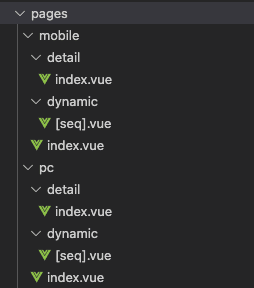
pages 폴더 내부에 pc, mobile 폴더를 나누고 각각 사용할 페이지 파일들을 구성합니다. 그리고 프로젝트 루트에 app 폴더를 만들고, 그 안에 router.options.ts 파일을 생성해 아래처럼 작성합니다.
import type { RouterConfig } from "@nuxt/schema";

export default <RouterConfig>{
  routes: (_routes) => {
    const { ssrContext } = useNuxtApp();
    const pcSubDomain = "localhost";
    const mobileSubDomain = "m";
    let routesDirectory: any = null;

    // server-side에서 url로 subDomain 체크
    if (process.server && ssrContext && ssrContext.event.node.req) {
      const req = ssrContext.event.node.req;
      const subDomain = req.headers.host?.split(".")[0];

      if (subDomain === "www" || subDomain === pcSubDomain) {
        routesDirectory = "pc";
      } else if (subDomain === mobileSubDomain) {
        routesDirectory = "mobile";
      }
    }

    // client-side에서 url로 subDomain 체크
    if (process.client && window.location.hostname) {
      const subDomain = window.location.hostname.split(".")[0];

      if (subDomain === "www" || subDomain === pcSubDomain) {
        routesDirectory = "pc";
      } else if (subDomain === mobileSubDomain) {
        routesDirectory = "mobile";
      }
    }

    // route의 경로와 pages 폴더의 경로를 비교
    function checkIsUnderDirectory(route: any, directory: "pc" | "mobile") {
      const path = route.path;
      return path === "/" + directory || path.startsWith("/" + directory + "/");
    }

    let newRoutes = [..._routes];

    if (routesDirectory) {
      newRoutes = _routes
        .filter((route: any) => {
          // routesDirectory가 pc면 pc 경로만, mobile이면 mobile 경로만 가져옴
          return checkIsUnderDirectory(route, routesDirectory);
        })
        .map((route: any) => {
          // 접근가능한 route 경로 재설정
          return {
            ...route,
            path: route.path.substr(routesDirectory.length + 1) || "/",
            name: route.name || "index",
          };
        });
      return newRoutes;
    }
  },
};
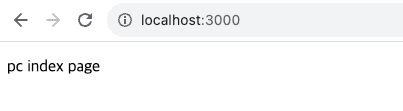
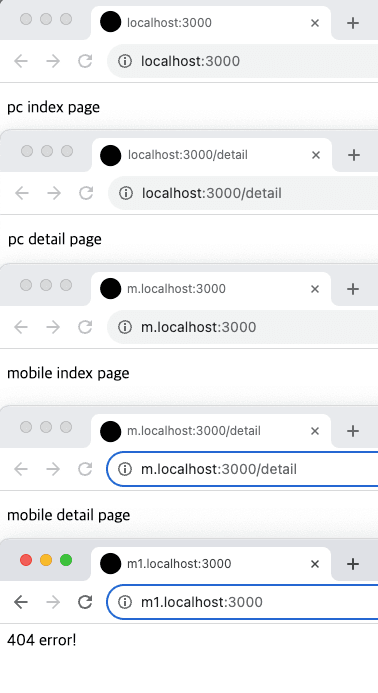
위 코드는 로컬 환경에서 테스트한 기준이며, PC 버전은 http://localhost:3000, 모바일 버전은 http://m.localhost:3000일 때 각각 화면이 출력되도록 작성했습니다.
코드를 나눠서 설명하면 다음과 같습니다.
const { ssrContext } = useNuxtApp();
const pcSubDomain = "localhost";
const mobileSubDomain = "m";
let routesDirectory: any = null;

// server-side에서 url로 subDomain 체크
if (process.server && ssrContext && ssrContext.event.node.req) {
  const req = ssrContext.event.node.req;
  const subDomain = req.headers.host?.split(".")[0];

  if (subDomain === "www" || subDomain === pcSubDomain) {
    routesDirectory = "pc";
  } else if (subDomain === mobileSubDomain) {
    routesDirectory = "mobile";
  }
}

// client-side에서 url로 subDomain 체크
if (process.client && window.location.hostname) {
  const subDomain = window.location.hostname.split(".")[0];

  if (subDomain === "www" || subDomain === pcSubDomain) {
    routesDirectory = "pc";
  } else if (subDomain === mobileSubDomain) {
    routesDirectory = "mobile";
  }
}
먼저 split(".")으로 host를 나누면 문자열 배열이 나오는데, 첫 번째 값이 m인지 여부에 따라 routesDirectory에 pc 또는 mobile 값을 할당합니다. 이 과정은 올바른 경로만 허용하기 위한 것으로, 서브도메인에 m이나 localhost 외의 값이 들어왔을 때 404를 반환하도록 하기 위함입니다.
위 코드에서는 server-side, client-side를 모두 체크하고 있습니다. 만약 nuxt.config.ts에서 ssr: false로 CSR 사이트를 구성하신다면, server-side 체크 로직은 제거(또는 주석 처리)하셔도 무방합니다.
// route의 경로와 pages 폴더의 경로를 비교
function checkIsUnderDirectory(route: any, directory: "pc" | "mobile") {
  const path = route.path;
  return path === "/" + directory || path.startsWith("/" + directory + "/");
}

let newRoutes = [..._routes];

if (routesDirectory) {
  newRoutes = _routes
    .filter((route: any) => {
    // routesDirectory가 pc면 pc 경로만, mobile이면 mobile 경로만 가져옴
    return checkIsUnderDirectory(route, routesDirectory);
  })
    .map((route: any) => {
    // 접근가능한 route 경로 재설정
    return {
      ...route,
      path: route.path.substr(routesDirectory.length + 1) || "/",
      name: route.name || "index",
    };
  });
  return newRoutes;
}
그 다음으로는 Nuxt가 파일 라우팅 기반으로 자동 생성한 route 객체를 수정해야 합니다. route 객체는 _routes 배열에 담겨 있고, filter로 각 route마다 checkIsUnderDirectory를 호출해 pages 폴더 구조와 일치하는 것만 걸러냅니다.
따라서 routesDirectory 값이 pc라면 pages/pc 하위 항목들만 가져오고, mobile이라면 pages/mobile 하위 항목들만 가져오게 됩니다.
이렇게 필터링된 newRoutes 배열을 다시 map으로 순회하면서 route의 path 값을 수정하면, Nuxt에서는 해당 경로만 접근 가능하도록 처리됩니다.
※ API 사용 시 참고
API 호출 시 CORS 오류가 발생한다면, 서버의 origin 예외 처리 항목에
http://m.localhost.com을 추가해주셔야 합니다.
실행 결과
하위 경로는 유지한 채 서브도메인에 맞는 페이지가 노출되고, 서브도메인에 잘못된 값을 넣으면 에러 페이지로 이동하는 것을 확인할 수 있습니다.
운영 환경에서의 에러 핸들링
위 코드에서는 서브도메인 값이 예상과 다를 경우 routesDirectory가 null로 남아 기본 route가 그대로 반환됩니다. 운영 환경에서는 잘못된 서브도메인 접근 시 명확하게 에러 페이지로 안내하는 것이 좋습니다.
// app/router.options.ts 내부
if (!routesDirectory) {
  // 허용되지 않은 서브도메인 접근 시 에러 페이지로 리다이렉트
  return [
    {
      path: '/:pathMatch(.*)*',
      name: 'not-found',
      component: () => import('~/pages/error.vue'),
    },
  ];
}
또한 서버 사이드에서 ssrContext나 req.headers.host가 예상치 못하게 undefined일 수 있으므로, optional chaining과 함께 fallback 처리를 추가하면 런타임 에러를 방지할 수 있습니다.
const host = ssrContext?.event?.node?.req?.headers?.host ?? '';
const subDomain = host.split('.')[0] || '';
캐싱 전략
서브도메인 분기 로직은 매 요청마다 실행되기 때문에, SSR 환경에서 트래픽이 많아지면 불필요한 연산이 반복될 수 있습니다. Nuxt 3의 routeRules를 활용하면 서브도메인별로 캐싱 정책을 적용해 서버 부하를 줄일 수 있습니다.
// nuxt.config.ts
export default defineNuxtConfig({
  routeRules: {
    // 정적 페이지는 ISR로 캐싱
    '/about': { isr: 600 },
    '/products/**': { isr: 120 },
    // API 프록시는 캐싱하지 않음
    '/api/**': { cache: false },
  },
});- ISR (120~600초): 자주 바뀌지 않는 페이지에 적용하면, 첫 요청만 서버에서 렌더링하고 이후에는 캐시를 반환합니다.
/about처럼 거의 변경되지 않는 페이지는 600초(10분),/products/**처럼 간헐적으로 갱신되는 페이지는 120초 정도로 차등 적용합니다. TTFB가 수백 ms에서 수십 ms 수준으로 줄어듭니다. - SWR (30~60초): 실시간성이 낮은 API에 적용하면 반복 호출을 절반 이상 줄일 수 있습니다.
- No Cache: 인증이나 결제처럼 항상 최신 데이터가 필요한 API는 캐싱 없이 유지합니다.
샘플 코드
git 저장소 이동 (https://github.com/MochaChoco/sub-domain-test)